

MINIMAL BY DESIGN
Keep the context. Lose the friction.
Receipts carry details that are easy to lose: what you bought, where you were, and when the money left. Centee keeps that context close to the expense instead of leaving it in a photo library.
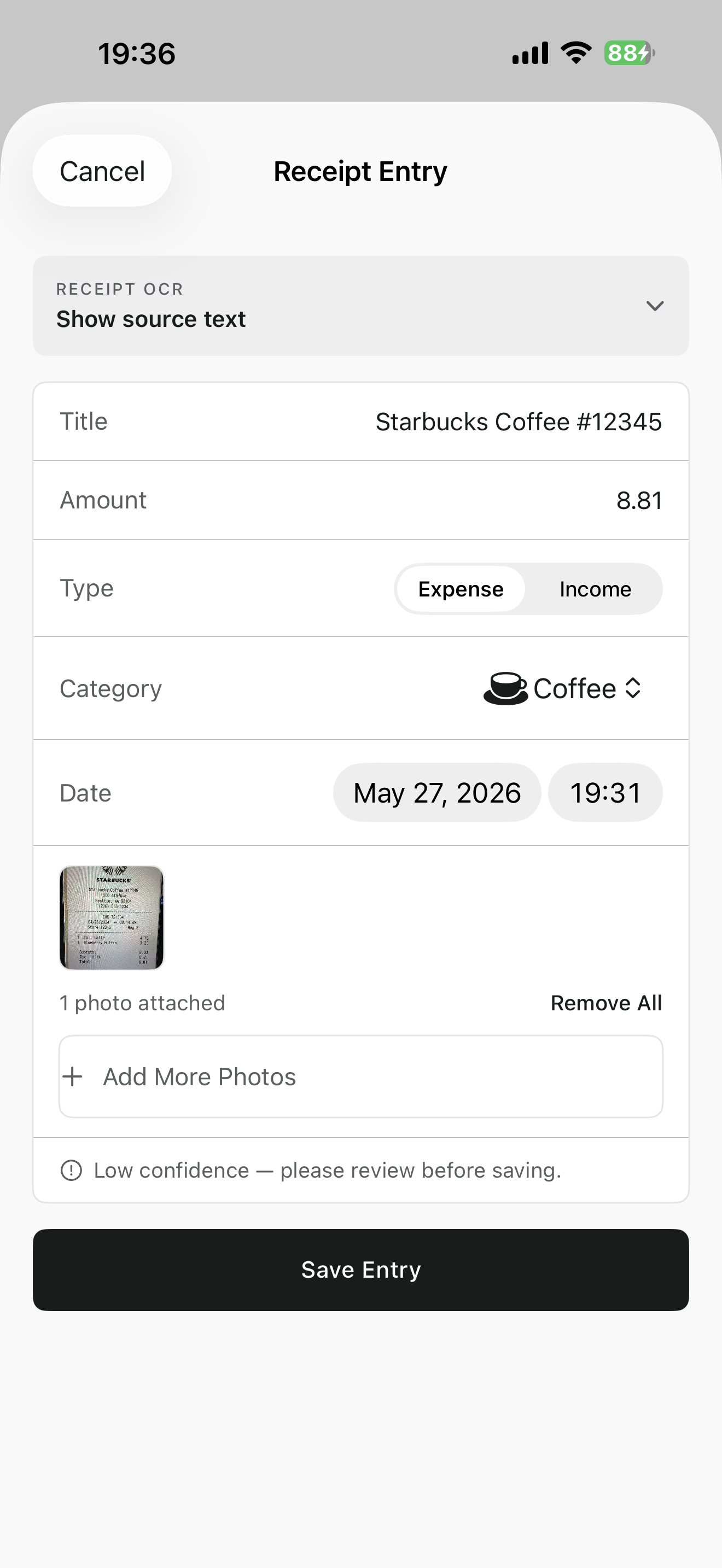
Scan a bill or receipt, let Centee prepare the starting details, and make any edits you need before it becomes part of your record.
HOW IT WORKS
From moment to a record you understand.
- 01
Scan the receipt
Capture the bill or receipt while the purchase is still easy to identify.
- 02
Review the suggested record
Check the amount, merchant, category, date, and payment method before saving.
- 03
Keep the original context
Store the receipt alongside the expense so the record remains useful later.
WHAT STAYS SIMPLE
Built around the way you actually spend.
- Keep receipt details tied to the spending record they explain.
- Start from suggested fields, then edit anything that needs your attention.
- Use the same calm record flow for receipts, quick entries, and screenshots.
COMMON QUESTIONS
A few useful answers.
Can I edit a scanned receipt entry?
Yes. Centee prepares a starting point, but you can review and edit the details before saving the expense.
Do I have to connect a bank account to scan receipts?
No. Receipt scanning works independently of bank linking.
Can I keep the receipt with the expense?
Yes. Centee is designed to keep the original receipt context attached to the record you save.
START SIMPLY